01
The data model
Your columns become a proper database with rules. Each customer, job or order exists once, every field has a type, required values are required, and a date can no longer end up in the price column.
From spreadsheet to software
Excel to web app, done properly: the master spreadsheet your team fights over becomes a custom web application with logins, history and reports.
The reality of the shared spreadsheet
One person has it open, another saves a copy to get on with their day, and by Friday there are three versions and nobody is sure which one is right. The file called final has a number on the end, and the number keeps going up.
The person who built the sheet has moved on, or is the only one who understands it. A column of nested formulas holds the business together and everyone knows one wrong keystroke takes it down. So nothing gets changed, and the workarounds pile up around it.
A price, a deadline or a status was different last week. Who changed it, when, and what was it before? A spreadsheet cannot tell you. A proper database records every change, so the answer is a click away instead of an argument.
What we build for you
Each part closes a gap the spreadsheet cannot. Together they replace the shared file without changing how your team thinks about the work. Four steps to get there: Audit, Scope, Build, Run. See how we work.
Your columns become a proper database with rules. Each customer, job or order exists once, every field has a type, required values are required, and a date can no longer end up in the price column.
Forms, lists, search and approvals, built around the way work moves through your team. Works on a laptop at a desk and on a phone on site. The workarounds stop being necessary.
Each person signs in as themselves. You decide who can see, edit or approve what. Every change is recorded: who made it, when, and what the value was before.
The numbers you used to assemble by hand are ready when you open the page. And yes, you can still export to Excel whenever you want a copy to analyse.
Pricing
Every project starts with a free 30-minute strategy call. We look at the spreadsheet together, tell you which tier fits, and commit to a fixed price. No deck, no follow-up if it isn't for you. The full tiers are on the pricing page.
£4,9502-3 weeks
The strategy call decides which tier fits your spreadsheet. If it needs the platform, we say so before you sign anything.
Book your free strategy callfrom £14,9506-10 weeks
Fixed price. Fixed timeline. 50% on signing, 50% on launch.
Book your free strategy call£99/moCancel anytime
For teams that want one person to call when something needs changing.
Book your free strategy callHonest scope
Not every spreadsheet should be replaced. Analysis, modelling and finance are what spreadsheets are for, and we will not talk you out of them. We replace the shared operational spreadsheet: the one several people edit, the one that holds the live list of jobs, orders or customers, the one the business stops when it breaks.
A question you need answered once. Pull the data out, pivot it, answer it, move on. Software would be slower here, which is why the new system exports to Excel in one click.
Scenarios, what-ifs, the budget you rebuild every quarter. The analyst's workbook is a thinking tool and it should stay flexible.
Your accountant's workbooks and the reconciliation sheets that feed them. Leave them where they are; the new system can hand them clean numbers.
Jobs, orders, customers, bookings, stock, cases: the live record the business runs on. One place, one version, always current.
As soon as more than one person changes the data, you need logins, permissions and a record of who did what. A file cannot give you that; a database can.
Prices, deadlines, statuses and quantities that trigger real work or real invoices. Rules on every field, history on every change, no silent overwrites.
If the spreadsheet is one part of a bigger system, that is bespoke software development: same team, same fixed price. And once the data lives in a database instead of a file, the repetitive work around it is a candidate for AI automation.
Live products we've built
We build and run live products ourselves. The Lingo Service platform is the closest example of what a spreadsheet replacement grows into: instant quoting, certified workflows and a client portal in one system. All case studies.
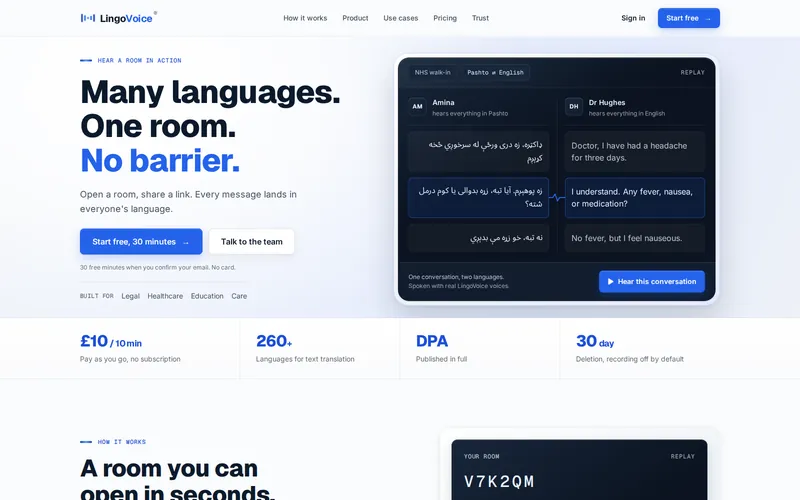
Real-time interpreting across 260+ languages in text, many of them with voice, built for healthcare, legal and critical conversations.
View case study: LingoVoice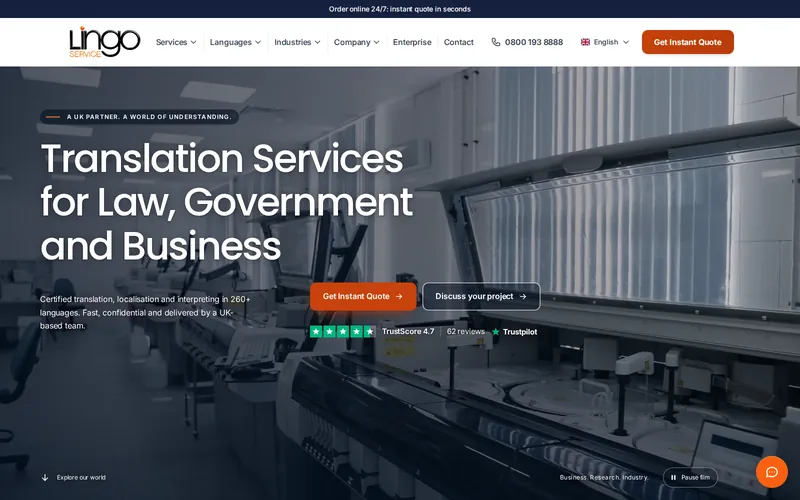
A UK translation agency's whole operation in one platform: instant quoting, certified workflows, client portal, and an embedded AI assistant qualifying leads 24/7.
View case study: Lingo Service
Certified Arabic translation with instant online quotes and same-day turnaround, accepted by the Home Office and UKVI, built and run as a live service.
View case study: Arabic Translation UKWhy this model fits a spreadsheet replacement
You already know the spreadsheet is a risk. What has been missing is someone who will turn it into a custom web application at a price agreed upfront, with nobody between you and the person building it.
Honest answers
Yes. Nothing changes for your team during the build. The spreadsheet stays the working copy right up to launch day, when we migrate the latest version into the new system and switch over. Same practice as our website switchovers: the old system stays live until the new one is verified, and you get a written launch-day report.
Yes, and it gets cleaned and validated first. Duplicates are merged, text dates become real dates, blanks are flagged and the competing versions are reconciled into one. Anything that does not fit the new rules is shown to you rather than silently dropped, and you check the result before it goes live.
Yes, for the everyday changes. Dropdown options, statuses, users and permissions live in admin screens, not code, so your team manages them without asking a developer. For changes that do need code, the care plan includes two hours of development a month, or your own developer can make them, because the code is yours.
Sometimes, yes, and we say so on the call. If the spreadsheet is a simple list with a few users and nothing to integrate, a no-code tool can do the job for a monthly fee, and we would rather tell you that than sell you a build. Custom software earns its place when you need your own rules, proper logins, integrations with the tools you keep, and code you own outright.
A simple internal tool with forms and a few screens can fit the Custom Website tier at £4,950. Most shared operational spreadsheets become a Custom Platform from £14,950: data model, screens, logins, history and reports. The price is fixed on the free 30-minute strategy call, then 50% on signing and 50% on launch.
The Custom Website tier takes 2-3 weeks. A Custom Platform takes 6-10 weeks, with the timeline fixed alongside the price. The process is the same four steps every time: Audit, Scope, Build, Run, with the spreadsheet migrated at the end so your team keeps working throughout.

30 minutes, free, direct with us. Bring the spreadsheet; we'll tell you what it should become, and what it shouldn't.